Major Storage Layouts
Introduction to Data Storage
- Memory Heirarchy (Visually)
- Data is stored in any secondary storage device such as a hard disk.
- To process any data you need to load the data from the hard disk on the main memory
- The CPU also has to load the data onto the caches of the computer
- The CPU will also load smaller bits of the data onto the register which it works directly on
- The higher the level of the memory the faster the processing speed however it has inverse the amount of memory space
- Secondary Storage / External Data Storage
- (Hard Disk)
- A mechanical device with different tracks and sectors
- To obtain a piece of data, a row of a table, it is stored on a sector (small arc) of a track (concentric circles) on a specific platter
- To read the data the reader has to reach a specific point on the platter and read the data
- Since the device is mechanical it is slow
- Tapes (Outdated)
- Can only read pages in sequence
- cheaper than disks used for archival storage
- Disks (more modern)
- Can retrieve random page at fixed cost
- Reading several consecutive pages is much cheaper than reading them in random order
- SSD (Solid State Drive)
- Uses flash drive technology and is faster than a disk
- (Hard Disk)
- Data on External Storage
- File : a logical collection of data, physically stored as a set of pages
- record 1 (ID, Name, Grade, etc.)
- File - record 1 --> n
- File organization : Method of arranging a file of records on external storage organized by Record ID (rid)
- Architecture
- Buffer manager stores pages from external storage to main memory buffer pool
- File and index layers make calls to the buffer manager
- File : a logical collection of data, physically stored as a set of pages
Alternative File organizations
- Heap Files
- Random Order, Suitable when typical access is a file scan retrieving all records
- data stored as multiple pages, header page and multiple data pages (subset of the table) connected in a heap (connected to each other through pointer)
- As data gets inserted it gets put into empty pages
- Advantages (effiecient)
- For bulk loading data
- for relatively small relations as indexing overheads are avoided
- when queries that need to fetch proportion of stored records
- Disadvantages (not efficient)
- for selective queries
- for sorting, may be time-consuming
- Sorted Files
- Best if records must be retrieved in some order or only a 'range' of records is needed
- Based off of some attribute
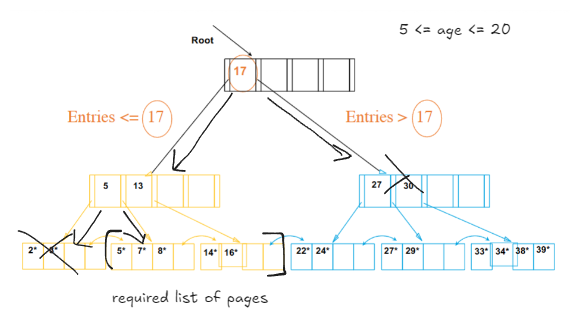
- Indexes (B+ Tree indexes example)
- Data structures to organize records via trees or hashing
- Speeds up selection on the search key fields
- Any subset of the fields of a relation can be the search key for an index on the relation
- An index contains a collection of data entries and supports effecient retrieval of all data entries k* with a give value k
- Cost Model
- Cost Measure - Number of page accesses
- Ex, if you are reading 3 pages, less time consuming, than reading 1 page
- A good cost model can help you identify ways to minimize page cost (I/O cost) and reduce time consumption in the application
- Reasoning
- Page access cost is usually the dominant cost of database operations
- An accurate model is too complex for analyzing algorithms
- Cost Measure - Number of page accesses
Major indexing schemes in database systems
Hash Based Indexing
- Good for equality selections
- to select a specific object based on an attribute (student; age = 10, id = 2)
- used in many applications such as finding a record from an id in a bank
- Hash function h :
- h(r) = bucket in which (data entry for) record r belongs. h looks at the search key fields of r
- the hash function takes the search key (id, age, etc.) and determines which bucket to store the data in
- Alternative for data entry *k in Index
- In a data entry *k we can store
- Data record with key value k
- <k, rid (record id) of data record with search key value k>
- <k, list of rids (record ids) of data records with search key k>
- In a data entry *k we can store
Index Classification
- Clustered vs Unclustered
- If order of data records is the same as, or 'close to', order of data entries, then called clustered index
- A file can be clustered on at most one search key
- If order of data records is the same as, or 'close to', order of data entries, then called clustered index
- Understanding the workload
- For each query in the workload
- Which relations does it access?
- if all the queries access the same relation that is a relation we can make an index on
- which attributes are retrieved?
- SELECT name FROM Employees WHERE age = ?
- which attributes are involved in selection/join conditions
- based of the type of query the chosen indexing can reduce the workload
- How selective are these conditions likely to be
- High selectiveness means you can take advantage of indexing, low selectiveness (90% of the database is being selected) means indexing might not be so useful
- Which relations does it access?
- For each update in the workload
- Indexing data means storing the key and requires storage overhead and requires maintenance.
- Which attributes are involved in selection/join conditions? How selective are these conditions likely to be?
- The type of update (INSERT/DELETE/UPDATE) and the attributes that are affected
- If you have a lot of maintenance or updates you need to be careful in choosing the index or to make one at all
- For each query in the workload
- Choice of Indexes
- What indexes should you create?
- Which relations should have indexes?
- What fields should be the search key?
- Should you build several indexes?
- For each index, what kind of an index should it be?
- Creating a new Index
- Guidelines
- Attributes in the WHERE clause : These are candidates for index keys
- Multi-attribute search keys : Keys should be considered when a WHERE clause contains several conditions
- Indexes benefit multiple queries : Since only one index can be clustered per relation, choose it based on important queries that would benefit the most from clustering
- Examples
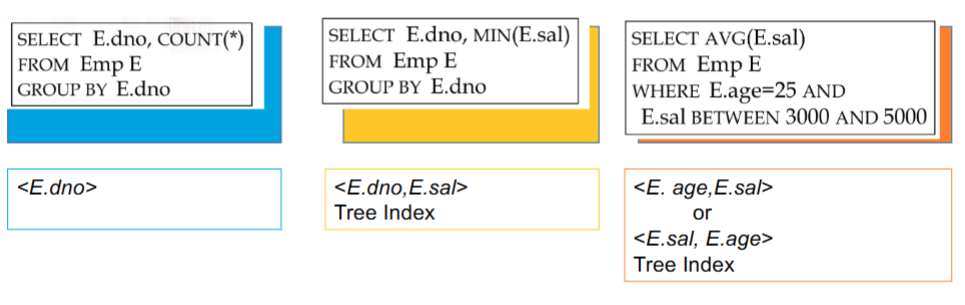
SELECT E.dno FROM Emp E WHERE E.age > 40- B+ tree index on E.age can be used to get qualifying tuples
SELECT E.dno COUNT(*) FROM Emp E WHERE E.age>10 GROUP BY E.dno- Consider the GROUP BY query
- Can also benefit from a B+ tree index
SELECT E.dno FROM Emp E WHERE E.hobby=Stamps- Equality queries and duplicates: Clustering helps
- Hash on Hobby
- Guidelines
- Indexes with Composite Search keys
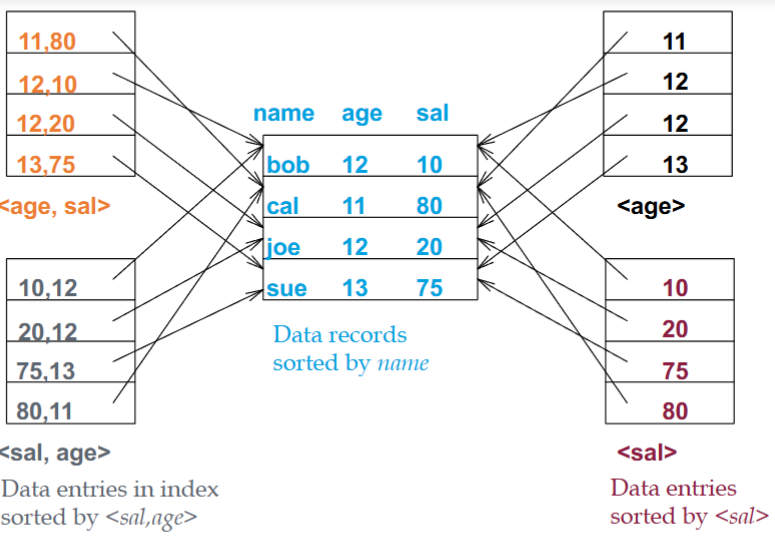
- You can have multiple indexes sorted by a single value or an index sorted by composite values such as <sal,age> which is sorted on salary or <age,sal> which is sorted on age
- Orthogonal to Clustering
- To retrieve Emp records with
- age=30 AND sal=4000
- an index of <age,sal>
- To retrieve Emp records with
- Clustered Tree
- If condition is: 20<age<30 AND 3000<sal<5000
- Index on <age,sal> or <sal,age>
- If condition is: 20<age<30 AND 3000<sal<5000
- Clustered
- If condition is: age=30 AND 3000<sal<5000
- Clustered <age,sal> index much better than <sal,age> index
- because age is more selective
- If condition is: age=30 AND 3000<sal<5000
- Index only Plans
- A number of queries can be answered without retrieving any tuples from one or more of the relations involved if a suitable index is available
Transactions/ACID Properties
Principles of Transactions : ACID Properties
A transaction is the DBMS's abstract view of a user program: a sequence of reads and writes
A user's program may carry out many operations on the data retrieved, but the DBMS is only concern about what data is red/written from/to the database
- Concurrency in DBMS
- We might have multiple transactions running at the same time; we might use queue to run them one-by-one; thus we need to reach concurrency among different transactions that run on the database system
- Potential Issues : Effects of interleaving transactions, and crashes
- Principles of Transactions
- Atomicity - all or nothing
- Every transaction needs to be atomic; all the transactions need to be run in their entirety or none at all
- The user either gets a message of the entire transaction running / not running as an atomic unit
- A transaction might commit after completing all it's actions or it could abort after executing some actions
- Always executing all actions in one step, or not executing any actions at all
- DBMS logs all actions so that it can undo the actions of aborted transactions
- Consistency - no violation of integrity constraints
- A designer can define many constraints on a database, and a transaction must leave the database in the same consistent (following all constraints) state
- Internal Consistency - A transaction which executes along against a consistent database leaves it in a consistent state
- Transactions do not violate database integrity constraints
- Transactions are correct programs
- Isolation - concurrent changes invisible -> serializable
- Each transaction must run as if there are no other transactions running in the system
- Serializability - If several transactions are executed concurrently, the results must be the same as if they were executed serially in the same order
- Incomplete Results - An incomplete transaction cannot reveal it's results to other transactions before its commitment
- Durability - committed updates persist
- Once a transaction commits, the system must guarantee that the results of its operations will never be lost, in spite of subsequent failures
- Once a transaction commits, the system must guarantee that the results of its operations will never be lost, in spite of subsequent failures
- Atomicity - all or nothing
Concurrency Control in Database Systems
Concurrency Control
From above example
- The organization of transactions as shown above is known as a schedule
Scheduling Transactions - Serial Schedule
- Schedule that does not interleave the actions of different transactions
- Equivalent Schedule
- If S1 and S2 are two schedules we call them equivalent if the effect of two schedules on the database is the same
- For any database state, the effect of executing the first schedule is identical to the effect of executing the second schedule
- Serializable Schedule
- A schedule that is equivalent to some serial execution of the transactions
- If S1 and S2 are two schedules we call them equivalent if S2 is a serial schedule (no interleaving) and S1 is equivalent to it
S1
T1 :  A = A + 100                 B = B - 100
T2 :                 A = 1.06 * A                B = 1.06 * B
This is ok but what about
S2
T1 : A = A + 100                               B = B-100  (This loses the
T2 :             A = 1.06 * A \\ B = 1.06 * B                bank money)
---------------------------------------------------------------------------
T1 : R(A) W(A)                          R(B) W(B)
T2 :             R(A) W(A) \\ R(B) W(B)
Conflict Serializable Schedules
- Two schedules are conflict equivalent if
- Involve the same actions of the same transactions
- Every pair of conflicting actions is ordered the same way
- Schedule S is conflict serializable if S is conflict equivalent to some serial schedule
- To find out if we have a conflict serializable schedule by drawing a dependency graph
- one node per transaction
- Edges from Ti to Tj if Tj reads/writes an object last written by Ti
- If a dependency graph has no cycles it is conflict serializable
Lock-Based Concurrency Control and Recovery from Failures
Lock-based concurrency control
Strict Two-phase Locking (Strict 2PL) Protocol:
- Each transaction must obtain a Shared lock on object before reading, and an exclusive lock on object before writing.
- All locks held by a transaction are released when the transaction completes
- Strict 2PL allows only serializable schedules.
- It simplifies transaction aborts
Lock Management
- It simplifies transaction aborts
- Lock and unlock requests are handled by the lock manager
- Locking and unlocking have to be atomic operations
- Lock upgrade : transaction that holds a shared lock can be upgraded to hold an exclusive lock
- Lock Entry Table
- Client || Lock Mode || Lock Argument
- Shared : S // Exclusive X
Deadlocks- Cycle of transactions waiting for locks to be released by each other.
- Deadlock Detection
- Create a waits-for graph:
- Nodes are transactions
- There is an edge from Ti to Tj if Ti is waiting for Tj to release a lock
- Periodically check for cycles in the waits-for graph
- Create a waits-for graph:
T1 : S(A) R(A)       S(B)
T2 :            X(B) W(B)            X(C)
T3 :                       S(C) R(C)
T4 :                                 X(B)
T1 : S(A) R(A)       S(B)
T2 :            X(B) W(B)            X(C)
T3 :                       S(C) R(C)       X(A)
T4 :                                 X(B)
Database Recovery
Fault -- causes --> Error -- results in --> Failure
Types of Failures
- Transaction Failures
- Transaction aborts (unilaterally or due to deadlock)
- Avg. 3% of transactions abort abnormally
- System failures
- Failure of processor, main memory, power supply, etc.
- Main memory contents are lost, but secondary storage contents are safe
- Partial vs. total failure
- Media failures
- Failure of secondary storage devices such that the stored data is lost
- Head crash/controller failure (?)
- Communication failures
- Lost/undeliverable messages
- Network partitioning
Local Recovery Management - Architecture
- Volatile storage
- Consists of the main memory of the computer system (RAM).
- Stable/Persistent storage
- Resilient to failures and loses its contents only in the presence of media failures (e.g., head crashes on dicks).
- Implemented via a combination of hardware (non-volatile storage) and software (stable-write, stable read, clean up) components.
- In-Place Update Recovery Information
- Every action of a transaction must not only perform the action, but must also write a log record to an append-only file
The Log
- Every action of a transaction must not only perform the action, but must also write a log record to an append-only file
- The following actions are recorded in the log:
- Ti writes an object; the old value and the new value.
- Log record must go to disk before the changed page!
- Ti commits/aborts: a log record indicating this action.
- Ti writes an object; the old value and the new value.
- Log records are chained together by Xact id) so it's easy to undo a specific Xact.
- All log related activities are handled transparently by the DBMS.
- The log contains information used by the recovery process to restore the consistency of a system. This information may include
- transaction identifier type of operation (action)
- items accessed by the transaction to perform the action
- old value (state) of item (before image)
- new value (state) of item (after image)
- etc.
Upon recovery:
- all of T1's effects should be reflected in the database (REDO if necessary due to a failure)
- non of T2's effects should be reflected in the database (UNDO if necessary)
Write Ahead Log Protocol - Notice:
- If a system crashes before a transaction is committed, then all the operations must be undone. Only need the before images (undo portion of the log).
- Once a transaction is committed, some of its actions might have to be redone. Need the after images (redo portion of the log).
- WAL protocol :
- Before a stable database is updated, the undo portion of the log should be written to the stable log
- When a transaction commits, the redo portion of the log must be written to stable log prior to the updating of the stable database.
Recovering from a crash
- there are 3 phases in the Aries recovery algorithm
- Analysis : Scan the log forward (from the most recent checkpoint) to identify all Xacts that were active, and all dirty pages in the buffer at the time of the crash
- Redo
- REDO'ing an action means performing it again
- The REDO operation uses the log information and performs the action that might have been done before
- The REDO operation generates the new image
- Undo
- UNDO'ing an action means to restore the object to it's before image
- The UNDO operation uses the log information and restores the old value of the object